
If you want to improve website speed, the biggest gains rarely come from one magic plugin. They come from fixing the few things that make most pages slow: heavy images, too much JavaScript, third-party tags and slow servers. This guide shows how we diagnose and fix speed problems at Savoir Management, and which targets to aim for.
Why does site speed matter for growth?
Speed affects whether visitors stay, how easily they convert and how Google evaluates page experience. Slow pages lose people before they see your offer, which wastes ad spend and organic traffic.
Nielsen Norman Group found users often leave pages within 10 to 20 seconds, and slow loading uses up that window. Google includes Core Web Vitals in its page experience guidance.
What speed targets should you aim for?
Aim for "good" Core Web Vitals: Largest Contentful Paint within 2.5 seconds, Interaction to Next Paint of 200 milliseconds or less and Cumulative Layout Shift of 0.1 or less, measured on real visits.
These thresholds come from web.dev's Web Vitals guide. Check yours in PageSpeed Insights and the Core Web Vitals report in Search Console.
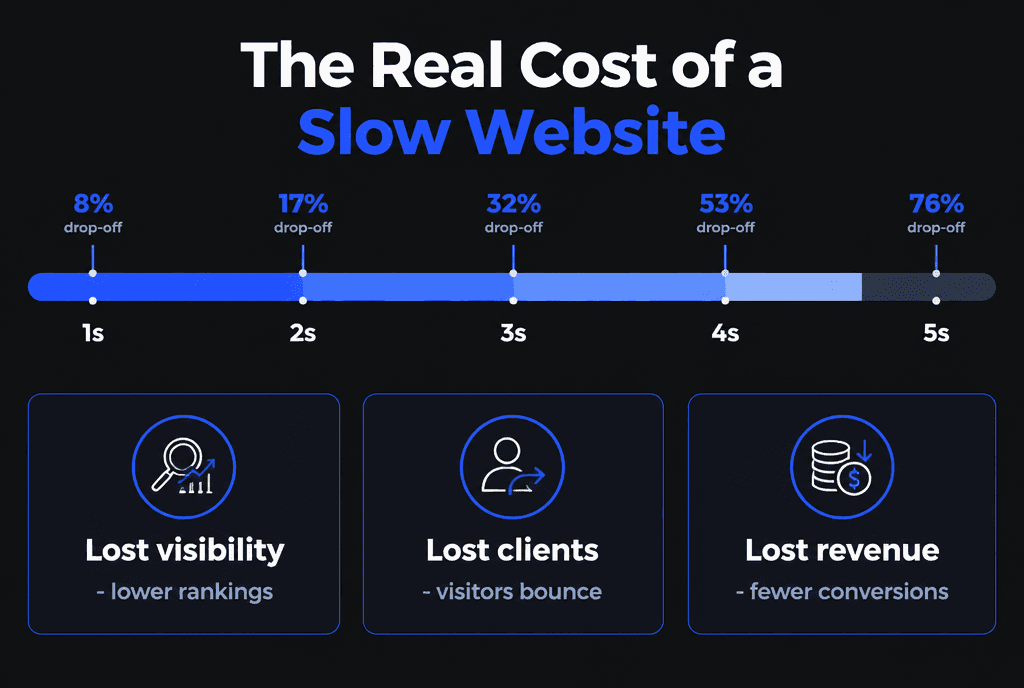
What is the real cost of a slow website?
Lost visitors, lower conversion rates, higher cost per lead from ads and weaker search performance. The cost compounds because every channel sends traffic to the same slow pages.
Which development fix improves speed the most?
For most sites, the single biggest fix is optimizing the largest content element, usually the hero image: resize it, serve WebP or AVIF, preload it and avoid lazy-loading it. That often improves LCP dramatically.
web.dev's guide to optimizing LCP explains each step. Then tackle the rest:
Images: compress, resize to display size, use modern formats and lazy-load below-the-fold images.
JavaScript: remove unused scripts, defer non-critical code and audit third-party tags.
Fonts: limit families and weights, preload key fonts and use font-display swap.
Layout stability: set image and embed dimensions to prevent shifts.
Server: use caching, a CDN and hosting with fast response times.
How do you fix slow interactions?
Slow interactions usually come from long JavaScript tasks. Break up heavy scripts, remove unused code and third-party widgets, and keep event handlers light so the page responds within 200 milliseconds.
See web.dev's guide to optimizing INP.
How do faster websites drive long-term performance?
Faster sites convert more of the traffic you already have, make ads more efficient and give content a better chance in search. Speed improvements keep paying off as long as the site is maintained.

Why do businesses overlook speed problems?
Owners usually test on fast office connections and powerful computers, while customers use mid-range phones on mobile networks. Plugins, tags and new content also slow sites gradually, so nobody notices the decline.
Test on a real mid-range phone, check field data rather than only lab scores, and review speed after every major change.
What does a speed optimization project look like?
Measure, find the biggest bottlenecks, fix them in order of impact, then monitor. Most projects deliver the largest improvement in the first few fixes.
Baseline Core Web Vitals and key page load times
Image and font optimization
Script and plugin audit
Caching, CDN and hosting review
Monthly monitoring
How do you optimize images for speed?
Resize images to the size they display at, compress them, serve modern formats such as WebP or AVIF, use responsive images for different screens and lazy-load images below the fold. Never lazy-load the main hero image.
Images are usually the largest files on a page. A practical workflow:
Export images at the maximum display size, not the camera's full resolution
Compress them and convert to WebP or AVIF
Use srcset and sizes so phones download smaller versions, as explained in MDN's responsive images guide
Set width and height attributes to prevent layout shifts
Use browser-level lazy loading for images further down the page
How do fonts affect page speed?
Each font family and weight adds a file to download. Limit fonts to what the design needs, self-host or preload the most important ones and use font-display swap so text appears immediately.
Two families with a few weights each is enough for most sites. Variable fonts can replace several static weights with one file. Check that fallback fonts have similar sizing to reduce layout shift when the custom font loads.
How do third-party scripts slow sites?
Chat widgets, analytics, ad pixels, heatmaps, embedded videos and social feeds all load extra code, often from other servers. Each one can delay loading and make interactions sluggish.
Audit every script: who owns it, what it is used for and whether it is still needed. Remove unused tags, load non-critical scripts after the page is interactive and use lightweight facades for embeds such as videos and maps, loading the full embed only when a visitor clicks. A tag manager helps control scripts but does not make them lighter.
How does hosting affect speed?
Slow servers delay everything that follows. Quality hosting, server-side caching, a content delivery network and up-to-date server software reduce the time before the first byte arrives.
If your server response time is consistently slow, no amount of front-end optimization will fully fix the page. Shared hosting with overloaded servers is a common culprit for small business sites. A CDN serves static files from locations closer to visitors, which helps especially for audiences spread across regions.
How should CMS sites like WordPress be optimized?
Use a lightweight theme, remove unused plugins, enable caching, optimize the database and keep PHP and software updated. Page builders and plugin-heavy setups are common causes of slow WordPress sites.
Each plugin can add scripts, styles and database queries. Review plugins regularly and replace heavy ones with lighter alternatives or custom code. WordPress recommends modern PHP versions in its requirements; upgrading often brings noticeable speed gains.
What is the difference between lab and field data?
Lab data comes from controlled tests and helps diagnose problems; field data comes from real visitors and shows actual experience. Google's Core Web Vitals assessment uses field data.
PageSpeed Insights shows both. A good lab score with poor field data often means real users have slower devices or networks than your test. Prioritize improvements that move field data, and track them over the 28-day window Google reports.
How do you keep a site fast over time?
Set performance budgets, test speed after every major change, review plugins and scripts quarterly and monitor Core Web Vitals monthly. Sites usually get slower gradually as content and tools are added.
Assign responsibility for performance, just as you would for security. Include speed checks in your publishing process: compressed images, no unnecessary embeds and no new scripts without review.
How much faster can a site get?
It depends on the starting point. Sites with oversized images, heavy themes and many scripts often see dramatic improvements; already-optimized sites gain less. Measure before and after so improvements are real, not estimated.
Focus on reaching "good" Core Web Vitals for most visitors rather than chasing a perfect lab score. Faster pages support conversions and search visibility, which is where the business value lies. Our guide to e-commerce upgrades that increase sales shows how speed fits into store optimization.
How does Savoir Management implement speed solutions?
We audit field and lab data, fix images, scripts, fonts and hosting in order of impact, and set performance budgets so the site stays fast as content and features grow.

Speed is part of every build: see mobile-responsive web development, web development mistakes that hurt SEO and our website launch checklist. Online stores should read e-commerce upgrades that increase sales. Our web development team handles speed audits and rebuilds.


