SEO-friendly web development makes everything else in SEO easier. Great content and links cannot fully overcome a site that is slow, hard to crawl or confusing on mobile. These are the seven development mistakes we fix most often at Savoir Management, with the practices that prevent them.
Why are web development and SEO inseparable?
Search engines must crawl, render and understand your pages before they can rank them. Development decisions about structure, speed, links and code determine whether that happens smoothly.

Google's SEO Starter Guide covers the fundamentals every developer should know.
Mistake 1: Are you ignoring mobile optimization?
Google mainly uses the mobile version of your site for indexing and ranking. If content, links or structured data are missing or broken on mobile, rankings suffer.
Follow Google's mobile-first indexing best practices. Read our mobile-responsive development guide.
Mistake 2: Is your site too slow?
Slow pages hurt users and page experience. Oversized images, heavy JavaScript and slow servers are the usual causes.

Aim for good Core Web Vitals and check PageSpeed Insights. See our site speed guide.
Mistake 3: Is your URL structure weak?
Long, parameter-heavy or frequently changing URLs confuse users and search engines. Use short, descriptive URLs and redirect any URL you change.
Use 301 redirects for moved pages, especially during a website redesign.
Mistake 4: Are you neglecting on-page SEO elements?
Every page needs a unique, descriptive title, a single clear H1, logical subheadings, a helpful meta description and descriptive image alt text.

Google explains how it creates title links and snippets.
Mistake 5: Do you have duplicate or thin content?
Near-identical pages and pages with little useful content dilute rankings. Consolidate duplicates, use canonical tags and make each page genuinely helpful.
See Google's guidance on consolidating duplicate URLs and creating helpful content.
Mistake 6: Is your internal linking weak?
Internal links help search engines discover pages and understand topics. Link related articles and services with descriptive anchor text using standard, crawlable links.

Google requires crawlable links built as standard HTML anchor elements with an href.
Mistake 7: Are you skipping security and HTTPS?
Sites without HTTPS show browser warnings, lose trust and miss part of Google's page experience signals. Secure every page and keep software updated.
Read Google's page experience guidance and protect sites against the OWASP Top 10.
Bonus mistake: Are you blocking search engines by accident?
A leftover noindex tag, an overly strict robots.txt file or important content loaded only after user interaction can keep pages out of search results. These mistakes are common after launches and redesigns.
Check that production pages do not carry a noindex tag left from staging, as described in Google's guide to blocking indexing with noindex. Review robots.txt using Google's robots.txt introduction, and make sure CSS and JavaScript needed to render pages are not blocked. Use the URL Inspection tool in Search Console to see how Google renders key pages.
Bonus mistake: Are you ignoring structured data?
Structured data helps search engines understand your business, products, articles and FAQs. Missing or invalid markup means missed opportunities for richer search appearances and clearer understanding.
Google's introduction to structured data explains supported formats. Add Organization or LocalBusiness markup sitewide, Article markup on posts, Product markup on product pages and BreadcrumbList for navigation. Validate with the Rich Results Test after every template change.
Bonus mistake: Is JavaScript hiding your content?
Sites that rely heavily on client-side JavaScript can delay or hide content from search engines and slow down users. Important text, links and metadata should be present in the rendered HTML quickly.
Server-side rendering or static generation for key pages makes content immediately available. Use standard links with href attributes for navigation, avoid content that appears only after clicks or scrolling, and test pages with JavaScript disabled to see what remains.
Bonus mistake: Are images unoptimized for search?
Large, unlabeled images slow pages and miss image search traffic. Use descriptive file names, meaningful alt text, appropriate sizes and modern formats.
Google's image SEO best practices recommend placing images near relevant text and describing them accurately. Browser-level lazy loading helps images further down the page load only when needed.
How do these mistakes show up in Search Console?
Search Console's page indexing report shows pages excluded by noindex, blocked by robots.txt, redirected, duplicated or not found. The Core Web Vitals report shows slow templates, and the enhancements reports show structured data errors.
Check these reports monthly and after every major change. A sudden rise in excluded pages, a drop in valid structured data items or new "poor" URLs in Core Web Vitals usually points to a recent change. Open the affected URLs with the URL Inspection tool to see exactly what Google sees, fix the cause on the template rather than page by page, then validate the fix in Search Console so Google rechecks the pages.
How do you run a technical SEO audit?
Crawl the site, review Search Console reports, check Core Web Vitals, inspect key templates and compare findings against a checklist covering indexing, structure, speed, content and links.
A practical audit sequence:
Search Console: indexing, page experience and manual actions
Crawl: broken links, redirects, duplicate titles and missing tags
Speed: PageSpeed Insights on each main template
Structure: headings, internal links and URL patterns
Content: thin or duplicate pages and outdated information
Structured data: validation and coverage
Prioritize fixes that affect many pages or your most valuable pages first.
How do you prevent mistakes during future updates?
Use a pre-publish checklist, review technical SEO before releasing new templates or plugins, monitor Search Console weekly and run a full audit after major changes.
Most SEO damage happens during changes: redesigns, platform migrations, new plugins or content restructuring. Build SEO checks into those processes, and keep a change log so you can connect ranking shifts to specific updates.
How does SEO-friendly development help AI search?
Clean structure, direct answers, accurate structured data and trustworthy sources make content easier for AI-powered search features to understand and cite. The same practices that help traditional SEO help answer engines.
Pages that state the question, answer it concisely and support the answer with detail and references are easy to extract and summarize. Google's guidance on helpful, people-first content applies equally here.
How do these mistakes impact brand visibility?
Each mistake reduces how many pages get indexed, how well they rank and how many visitors convert. Together they can make a strong business nearly invisible in search.
Which SEO-friendly practices actually work?
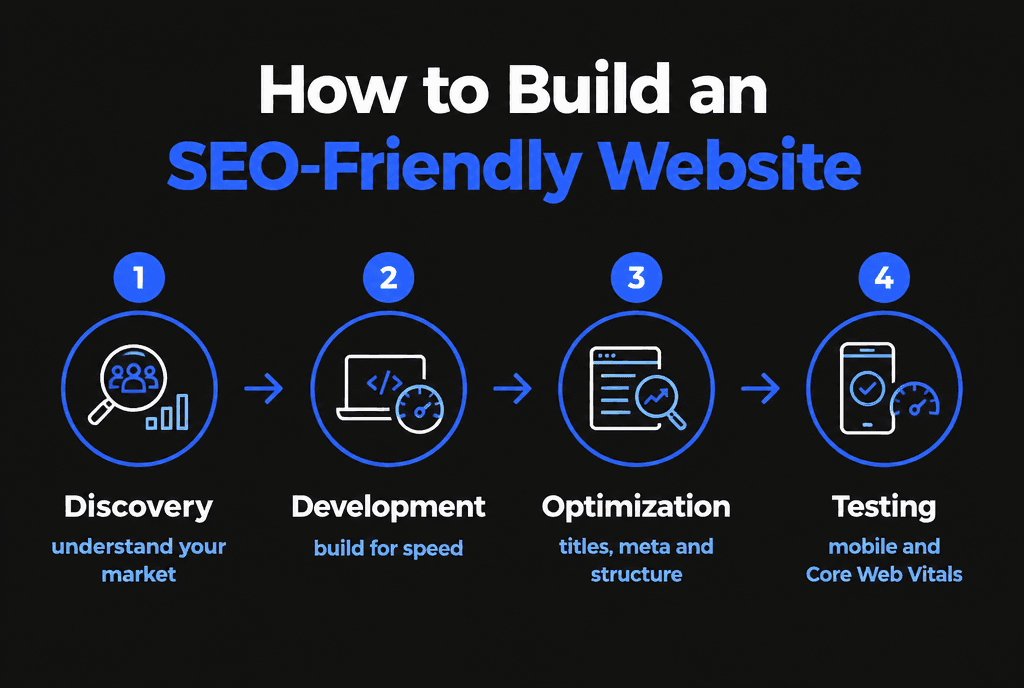
Build mobile-first, set performance budgets, plan URLs and redirects, write unique on-page elements, add structured data, link related content and test with Search Console before and after launch.
How does Savoir Management build SEO-friendly websites?
SEO is part of our build process: sitemap and URL planning, semantic templates, speed budgets, structured data, internal linking and launch checks.
Read our guides to SEO-optimized web development and the website launch checklist. Our web development team builds SEO-ready sites.