
YouTube ads for beginners can feel intimidating because they combine two platforms: YouTube for the video and Google Ads for targeting and billing. This blueprint simplifies it into eight steps, from setup to your first sales, using the same process we use when launching YouTube campaigns for clients at Savoir Management.
Step 1: How do you set up YouTube advertising?
YouTube ads are created in Google Ads, not in YouTube Studio. You need a Google Ads account, a YouTube channel with your ad video uploaded (public or unlisted), the channel linked to Google Ads, and conversion tracking on your website.
Create or sign in to Google Ads.
Upload your ad to your YouTube channel. Unlisted is fine.
Link the channel to Google Ads so you can remarket to viewers.
Install conversion tracking for purchases or leads.
Step 2: Which YouTube campaign type should beginners choose?
Choose a Video campaign with a sales or leads goal, or a Demand Gen campaign, when you want conversions. Use awareness or reach goals only when brand recall is the objective.
Google explains the options in its overview of Video campaigns and Demand Gen campaigns. Demand Gen runs across YouTube, Shorts, Discover, Gmail and more, and is built for action-oriented advertisers.
Step 3: What is the winning formula for a beginner's YouTube ad?
The winning formula is hook, value, offer. Stop the scroll in the first five seconds, show why your product solves the problem in the middle, and end with a clear, irresistible reason to act now.
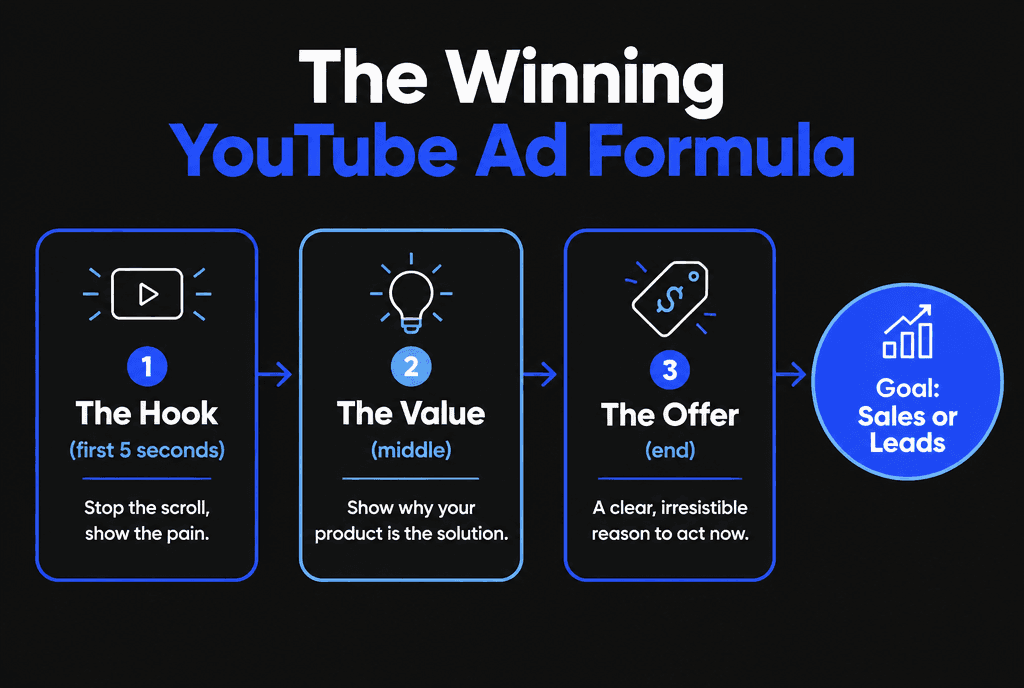
Hook: show the pain or the desired result immediately.
Value: demonstrate the product, explain the mechanism, show proof.
Offer: a specific action with a reason to do it today.
For more script detail, read how to create YouTube ads that convert.
Step 4: How should beginners target YouTube ads?
Layer audiences instead of picking one. Combine custom segments built from search terms your buyers use, in-market audiences for your category, and your own data segments of site visitors and viewers.
Custom segments: people who searched terms like "best project management software."
In-market audiences: people Google identifies as actively researching a category.
Your data segments: website visitors, video viewers and customer lists, set up through data segments.
Start with two or three ad groups, each built on one audience layer, so you can see which works.

Step 5: What budget should a beginner set?
Start with $20 to $50 a day per campaign for two to four weeks. Put most of the budget on the audience closest to buying, and avoid splitting a small budget across many ad groups.
Step 6: What is the 20/80 rule for YouTube ads?
The 20/80 rule means roughly 20% of your audiences and videos will produce about 80% of results. Find that 20% fast by testing, then move budget to it instead of spreading spend evenly.
Each week:
Rank ad groups and ads by cost per conversion.
Pause the bottom performers.
Shift their budget to the top performers.
Add one new video or audience to test.

Step 7: Which bidding strategy should beginners use?
Begin with Maximize Conversions or the campaign's default conversion bidding, then switch to Target CPA once you have steady conversion volume. Automated bidding needs conversion data to work.
Read Google's guide to Target CPA bidding. Do not change bids, budgets and audiences all at once, because each change resets the learning period.
Step 8: How do you measure YouTube ad success?
Measure cost per conversion, conversion rate and return on ad spend first, then view rate and click-through rate to diagnose creative. Views alone do not pay the bills.
Use video ad formats that fit each goal, and review results weekly. When one audience and one video consistently hit your target, build out a full YouTube ads funnel.

What mistakes do beginners make with YouTube ads?
Beginners often optimize for views instead of conversions, skip conversion tracking, use long intros before the hook, target audiences that are too broad and judge results after a few days.
No conversion tracking, so Google cannot optimize for sales
Logo animations or long intros before the hook
One huge audience instead of layered tests
Sending clicks to the homepage instead of a matching landing page
Changing settings daily
Want a done-for-you launch? Our digital marketing team builds and manages YouTube campaigns, and our landing page development team builds the pages they send traffic to. You can also compare YouTube with TikTok ads for short-form video.


